The config file allows you to configure the content file (.PDF) and all variable elements in the preflight report such as text color, chapter title point size, etc.
About the configuration file
- The file has the extension .prefs and it is crucial that this extension, thus the format remains!
- Preferably you open the config file with the following application:
- Mac: TextEdit (preference set to .txt format)
- Windows: Notepad or Notepad++
- You can create more than one config file next to one content file. This allows you to use the same background template and icons with different settings. You could for example leave out chapters in one version.
- The location (for customized reports):
- On Mac: HD/Library/Preferences/Enfocus Prefs Folder/Report Templates/Custom/
- On Windows XP and 2003: HD\Documents and Settings\All Users\Application data (this is a hidden folder)\Enfocus Prefs folder\Report Templates\Custom
- On Windows 7, 2008 and newer versions: ..\ProgramData\Enfocus Prefs Folder\Report Templates\Custom
About the structure of the configuration file
- A .prefs file always starts with #BEGINPREFS and ends with #ENDPREFS.
- It can contain different sections ("dictionaries"), each starting with #BEGINDICT and ending with #ENDDICT. See Sections overview.
- Each section contains a number of settings or tags, explained further in this document. See All tags explained!.
- The order in which the sections and the tags (within a section) appear in the .prefs file is not important.
- You can differentiate the settings for languages other than English, by simply adding the correct language abbreviation to the tags.
-
You can do the same for the platform used.
Below is an example of the PitStopReportPDFTemplates section. This section is used to describe the look and feel of the report. It contains (among others) three settings that refer to the content file (PDF):
- "IconTemplatesPath" should be set to the name of the PDF containing the icons to be used in the report.
- "PageTemplatePath" should be set to the name of the PDF containing the background page.
- "FontTemplatesPath" should be set to the name of the PDF containing the font resources.
In this example, all the content information is stored in one PDF (recommended),
called PitStopReportDefault.pdf. For all languages, the same PDF is used, except for the
French reports: they have a different background page.
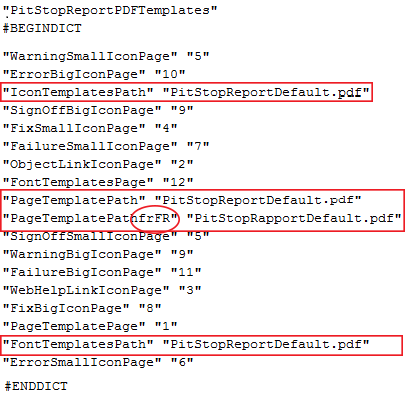
Note that the tags and the values in the .prefs file are enclosed in double quotation marks with whitespace in between.
Example 2:
In the example below, different fonts will be used depending on the language and the
platform:
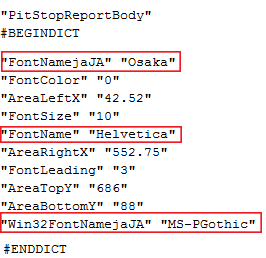
- "MS-PGothic” will be used for Japanese if you're on a Windows machine.
- "Osaka" will be used for Japanese on all other platforms.
- "Helvetica" will be used for all other languages.
Note: For an example file, refer to Example of a default report template (.prefs file).