This is an overview of the tags that can be used in the
PitStopReportFontChapter section in the config file (.prefs) of a regular
report template. This section is used to configure the content of the ‘Font Information’ chapter.
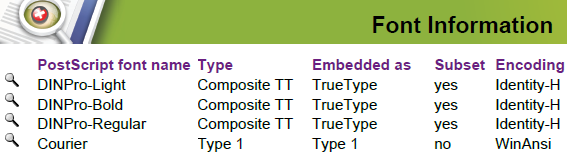
| Tag | Description and values |
|---|---|
| Columns | X-coordinates of the columns in the Certified PDF Workflow Information chapter. For
each column, you should provide 2 values (left and right side). This chapter has 6 columns
(defined by 12 values). Example: "42.52 60 65 280 285 355 360 435 440 475 480
552.75". Note: Don't forget the unit is points!
|
| IncludeThisChapter | Determines whether or not this chapter is included in the preflight report. Values:
|
| IncludeWhenEmpty | Determines whether or not this chapter is included in the preflight report when there
is no information available. Values:
|
| SpaceNeededToStartThisChapter | Determines how much space is needed to have the chapter start on the same page. For example, with value "300", this chapter will only start on the same page, if at least a space of 300 points is available. Otherwise it will start on the next page. Default value is "0" = This chapter always starts on the same page as the previous chapter. Note: This setting only applies if NewPageForNewChapter is set to "false". See
PitStopReportChapterTitles.
|