Before you start:
- In addition to your offline system on which PitStop Pro is installed, you must have a system with internet access to communicate with the Enfocus web server.
- You must have a product key.
- If you've never installed an Enfocus product before, you have to initialize the application first! See Initializing PitStop Pro (offline).
To activate PitStop Pro
-
On your offline system with PitStop Pro:
- In the About Enfocus PitStop Pro dialog box, on the License tab, enter your Enfocus ID and password. The Enfocus ID is a new account that replaces all former Enfocus accounts (the webshop, product activation and support portal account). If you don't have one yet, click the Create Enfocus ID link and follow the on-screen instructions.
- Click Sign in.
- Click Offline Activation. This button appears if PitStop Pro detects that there is no internet connection. If for any reason this button is not available, select the Offline mode checkbox at the bottom of the tab.
- Click Activate Key.
-
Enter your product key by doing one of the following:
- Type or copy-paste your product key in the Product key field.
- Browse to your product key license file (example: LicensesBackup.html) or drag it to the Product key field.
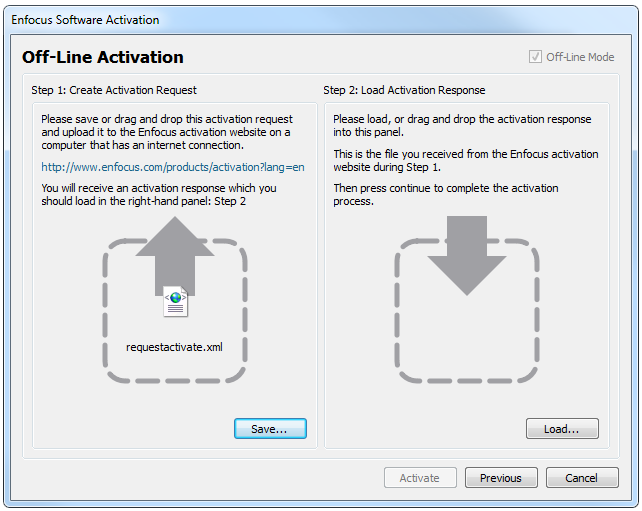
- Click Activate. The following dialog box opens:
- In Step 1, click Save. PitStop Pro creates a file: requestactivate.xml.
-
Make requestactivate.xml available on your online
system.
Example: You can copy requestactivate.xml to a USB stick, and connect the USB stick to your online system.
-
On your online system:
- Go to http://www.enfocus.com/products/activation?lang=en
- Upload requestactivate.xml, and click Continue.
- Fill in your Enfocus ID password, and click Continue.
- Click Continue to confirm. The Enfocus web server creates a file: activation-response.xml.
- Download the file.
-
On your offline system with PitStop Pro:
- In Step 2, upload activation-response.xml.
- Click Activate. Your system activates PitStop Pro.
- To close the confirmation dialog, click Close.