
The Ungroup element, used in combination with the Assemble job element, allows you to process files separately, while keeping track of their original place in the folder structure.
How does it work?
- The Ungroup element, placed at the beginning of the flow, disassembles the input files that enter the flow in a particular subfolder structure into separate files.
- Each of these files is processed separately (depending on the elements in the flow).
- At the end of the flow, an Assemble job element is used to
re-assemble the files into a job folder that is identical or similar to the incoming job
folder. Note: The Assemble job flow element offers different ways (schemes) for re-grouping the processed jobs. If you want to restore the original folder structure (=remembered by the Ungroup flow element), you should set the Scheme property to Ungrouped job.
The Subfolder levels property is another important property. To make sure that all subfolders are restored, we recommend entering a very high value (e.g. 999).
Example
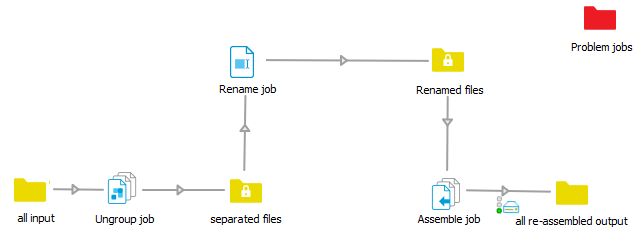
- First ungrouped
- Then renamed
- Finally re-assembled
We need so many intermediate folders, because only folder elements can be interconnected directly; between two non-folder elements, you need to add at least one folder element.
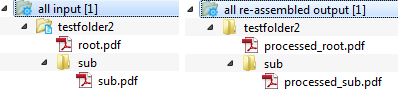
Below you can see the result of this flow: all files have been processed separately (i.e. the file names have changed), but the folder structure is still the same.
A job cannot be reassembled until all the files for that job are available. For example, if some of the input files are sent to the Problem jobs folder, the job cannot be reassembled!