The Action Lists dialog allows you to organize, access and run Action
Lists:
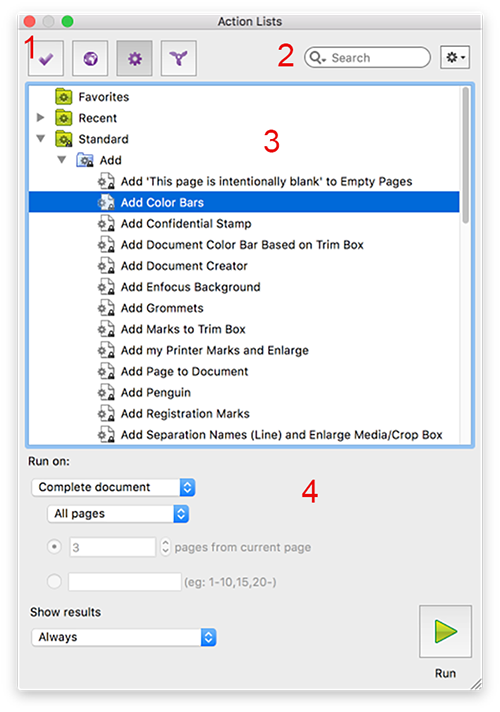
The Action Lists dialog consists of the following screen parts:
- You can open an existing Action List or a blank Action List (to create a new one).
- You can import, export, duplicate, and group Action Lists
- You can run Action Lists, i.e. apply them to one or more pages of the PDF you're editing.
The Action Lists dialog consists of the following screen parts:
| # | Description |
|---|---|
| 1 | Buttons to switch between Action Lists ( ) and other
"presets" (Preflight Profiles ) and other
"presets" (Preflight Profiles  , Global Changes , Global Changes  and
QuickRuns and
QuickRuns  ). ). |
| 2 | A search field (allowing you to search for a particular Action List) and an Action
menu  (allowing you to organize the Action Lists).
 |
| 3 | A workspace, which displays the available Action Lists. The Action Lists are
organized in folders, called "databases". By default, the following folders can be found:
|
| 4 |
The bottom part of the dialog allows you to run the Action List selected in the upper part of the dialog. You must indicate on which page(s) the Action List should run and whether or not the results should be shown in The Enfocus Navigator. |