Options
The following table gives an overview of the constant-specific options.
| Option | Description |
|---|---|
| Default Value |
Fixed value, which will be used when PitStop Pro runs a Preflight Profile that needs this variable. Note: Constant variables used in PitStop Server cannot be manipulated by the
user. Hence, PitStop Server will only use the default value.
|
| Allow manual input | Enables users to type values when they run the Preflight Profile. |
| Show a predefined list of values | Enables users to select a predefined value from a list of values. If the value type is Number or Length, you will have the possibility to mask the value and provide an alternate name for the user. Tip: You can change the order of the items in the list by just
selecting a value and dragging it up or down and dropping it in the desired
position.
|
Example
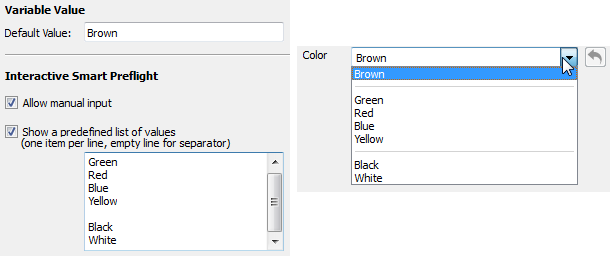
Below you can see an example of a constant variable definition (left) and the resulting
list the users will see when running the Preflight Profile (right).
.
Combining options
Allow manual input and Show a predefined list can be combined. The following table explains what this means.
| Selected options | Meaning |
|---|---|
| Both enabled | Users can either select a value from the predefined list but or manually enter a value. |
| Both disabled | Users will see the default value in a read-only text box. They cannot change it. |
| Only Allow manual input enabled | Users can manually enter a value. There is no list to choose from. |
| Only Show a predefined list enabled | Users can select a value from the predefined list. They cannot enter a value themselves. |