About rule based variables
The concept of a rule based variable is to build a variable that will change based on the state of another setting. For example:
Rule based variable "Image Resolution" is defined as follows:
IF "Job type" is "Offset" THEN set "Image Resolution" to 300 ppi
ELSE
IF "Job type" is "Digital", THEN set "Image Resolution" to 150 ppi
Rule based variables get their values based on one or more rules. Each rule has two parts: a condition to trigger the rule (IF) and the value to be used when that condition is triggered (THEN).
The condition contains one or more comparisons of a variable with a value. In the above example, the variable "Job type" is compared with the value "Digital". These comparisons can be combined with "AND" and "OR" to create complex conditions.
If a rule is not triggered, the next rule is tried. There must be an ELSE rule at the very end, that is triggered if none of the conditions are met.
Because a rule based variable always needs to be compared with one or more other variables, you will always need to create at least one other variable to make a rule based variable work. In the above example, you need to know the value of the "Job type" variable in order to determine the value of "Image Resolution". In PitStop Server, the variable to compare with will usually be a Job Ticket variable. In PitStop Pro, this will usually be a constant variable which offers the user a list of predefined constant values to choose from.
How to proceed
Proceed as follows:
- Define the variable(s) you need.
- Define the rule based variable itself:
- Choose Rule Based as Type and determine the value type, for example "Number".
- Build the rules:
- The first list (preceded by "IF") allows you to select any earlier defined variable.
- Choose "is", "is not", "begins with", ... as required and enter or select the appropriate value. Options depend on the variable chosen in the previous step.
- Click the appropriate operator (AND/OR). (The chosen operator is added to the
rule.)
AND/OR statements will add a condition to the selected rule, making the rule dependent on two or more conditions.
- Enter/Select the resulting value (the type depends on the chosen value type).
- If required, click ELSE to add an alternative rule to the overall variable (=IF) and proceed in the same way.
- Determine what should happen in case none of the conditions are met. You can either generate a failure (so the preflight check will generate a preflight error) or enter a default value.
- Save the Variable Set.
Example 1
Below you can see the definition of the "Image Resolution" rule based variable (value type = Number). It makes use of an earlier defined variable: "Job type", which is a constant (text) variable with "Offset" and "Digital" as possible values.
Depending on the value of "Job type", the Image Resolution will be different (300 or 150).
If the Job type is different from the ones for which a rule has been configured, a preflight
error will be generated. 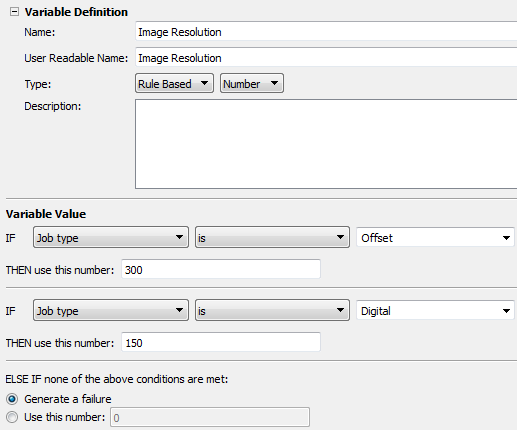
Example 2
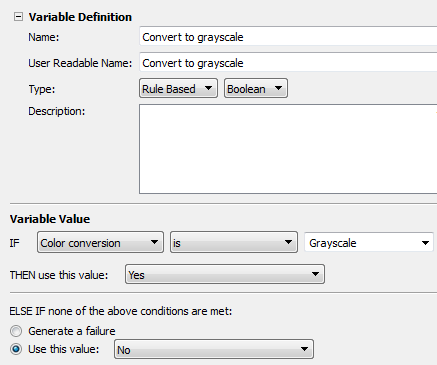
Below you can see the definition of the "Convert to grayscale" rule based variable (value type = Boolean). It makes use of an earlier defined variable: "Color conversion", which is a constant (text) variable with "Grayscale" as one of the possible values.
If the value of the "Color conversion" variable is "Grayscale", the value of "Convert to
grayscale" will be "Yes". If this is not the case (e.g. Color conversion is "CMYK"), the
value of "Convert to grayscale" will be "No" (=default value).