Please note that this is not a working tutorial but just an example of how to define a Rule Based variable.
-
Define Job Ticket Variable
- From within the Enfocus Variable Set Editor for your Variable set, create a new Job Ticket variable and name it “Job Type”. Assign a value from the XML/JDF job ticket as described in Creating Job Ticket variables. This value entry from the XML/JDF file will be used as the “trigger” for the rule-based variable.
-
Define the Rule Based variable
-
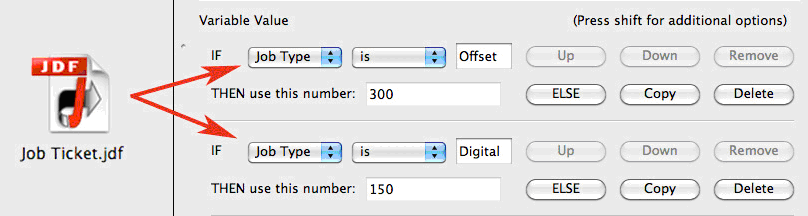
From within the Enfocus Variable Set Editor for
your Variable Set, create a new Rule Based and name it. The variable
type will be “Rule based” and “Number”. In this example, the rule has
two trigger variables, “Offset” and “Digital”. Each come from the Job
Ticket value previously defined as “Job Type”. In the
Variable Value, the Job Ticket variable is
selected to define where the variable trigger will come from. Then the
rule based statement is built according to the logic needed to use the
correct setting based on the value.
AND/OR/ELSE StatementsWhen working with Rule based variables, you can expand the variable argument by adding conditions to a single statement, and/or have multiple statements to reflect different results. Note that each new condition can use the same variable trigger or a different variable trigger.
AND/OR statements will add a condition to the selected statement. Making the statement dependent on two or more conditions.
ELSE adds an alternative statement to the overall variable, and there is always an exception ELSE statement at the end of the argument so that any exceptions are handled with a preflight error or with a default value.
-
From within the Enfocus Variable Set Editor for
your Variable Set, create a new Rule Based and name it. The variable
type will be “Rule based” and “Number”. In this example, the rule has
two trigger variables, “Offset” and “Digital”. Each come from the Job
Ticket value previously defined as “Job Type”. In the
Variable Value, the Job Ticket variable is
selected to define where the variable trigger will come from. Then the
rule based statement is built according to the logic needed to use the
correct setting based on the value.
-
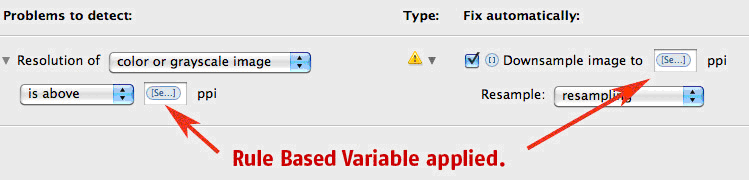
Assign the rule-based variable to a preflight check. To use the Rule Based
variable assign it to a preflight check. In this example, it is assigned to the
Images, Resolution check in two places. One for the Resolution check and again
as a value for a Fix to resample the image to the correct resolution if
required.