A HTML consists of two main parts:
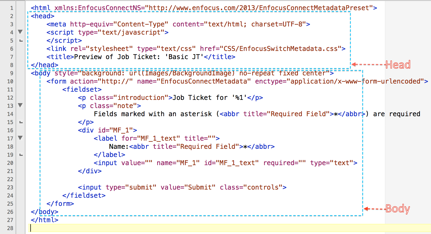
- HEAD (enclosed in <head> tags) : contains the scripts that control the elements in the body part and a link to the CSS file.
- BODY (enclosed in <body> tags) : contains the form elements that are displayed when submitting a job file to the Connector.
The code in the CSS file describes how the body and form part look like.
html {
    background: #eee;
     }
- The body part ("body") gets the same background. The text in the body part will use the Helvetica Neue font family (or, if not available: Helvetica, Arial, sans-serif) and have a fixed size.
body {
    background: #eee;
    color: #333;
    font: 75%/1.3 "Helvetica Neue", Helvetica, Arial, sans-serif;
    padding: 20px;
      }
- The form part ("form") of the body is embedded in a box (actually all HTML elements can be considered boxes). The margins, border and padding of this box can be changed through CSS. Padding is the white space between the element content and the element border.
form {
    padding: 20px;
    box-shadow: 0px 2px 4px 0px rgba(0, 0, 0, 0.16), 0px 2px 10px 0px rgba(0, 0, 0, 0.12) !important;
     }