Explaining a sample HTML Job Ticket and the associated CSS file

About the samples

The Connect user has no control over the HTML of the Basic Job Ticket. Connects provides a user interface for the definition of the fields and creates the Job Ticket in the background during the creation of the Connector.

However, in order to understand how your CSS - the part that you can control - will affect the Job Ticket, we provide you with two samples of the internal HTML used for the basic Job Ticket.

The CSS sample file provided here is the one used by Connect if you do not upload your own CSS. It's meant as an example to help you build your own CSS.

The sample files are enclosed in this document, at the end of this chapter.
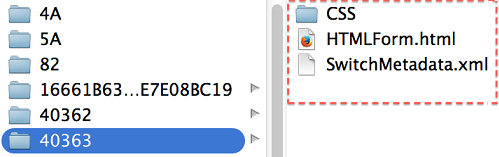
Location of the sample files on your computer

The HTML sample file is not meant to be viewed by Connect users. However, there is a way to capture it:
  1. In Connect, open the Job Ticket tab.
  2. Turn on Enable Job Tickets and choose a basic Job Ticket.
  3. Click the Preview button.
  4. Leave the Preview open, while searching for a recently created folder in the temp folder. There you should find the CSS folder, HTMLForm.HTML and SwitchMetadata.xml.

    The CSS sample file can be found on your local machine:
    • Mac: /Library/Application Support/Enfocus/Connect ALL/13/Connectors/HTMLMetadataResources/CSS
    • Windows: C:\ProgramData\Enfocus\Connect ALL\13\Connectors\HTMLMetadataResources\CSS