By default, the Adobe configurators installed with Switch are C++ versions compatible with "older" Adobe versions (Adobe CC 2014, Adobe CS6, Acrobat X and XI). However, if you're using one of the latest versions of the Adobe products (Adobe CC 2015 or Adobe Acrobat DC), you need the new versions of the Adobe configurators, i.e. the ones developed as scripted plug-ins. You can download these new scripted configurators from the Enfocus website (Switch Partner integrations overview/Adobe) or install them through Pack Manager as described below.
Note:
- Just like for other configurators for 3rd party applications, you must have activated or installed the Adobe products on the computer on which Switch Server is running. Otherwise you will not be able to use these configurators.
- You must have licensed the Configurator module.
- You must install each Adobe configurator separately (Distiller, Photoshop, Acrobat, ...). It is not possible to install all Adobe configurators in one go.
To install a scripted Adobe configurator
- In Switch, go to . Enfocus Pack Manager is displayed.
- In the Sources column, click Installed.
-
Select the appropriate Adobe configurator.
You will see an orange icon (
 ) at the right hand side indicating that an older
version (i.e. the C++ version) of the configurator has been installed.
) at the right hand side indicating that an older
version (i.e. the C++ version) of the configurator has been installed.
- Click Update. A dialog appears.
- To close Switch, click .
-
To confirm your choice, in the Enfocus Pack Manager dialog, click
OK.
After a while, the icon turns green (
 ), indicating that the most recent version (i.e. the
scripted version) has been installed.
), indicating that the most recent version (i.e. the
scripted version) has been installed.
-
Restart Switch.
The Adobe configurator in the Flow elements pane now supports the latest
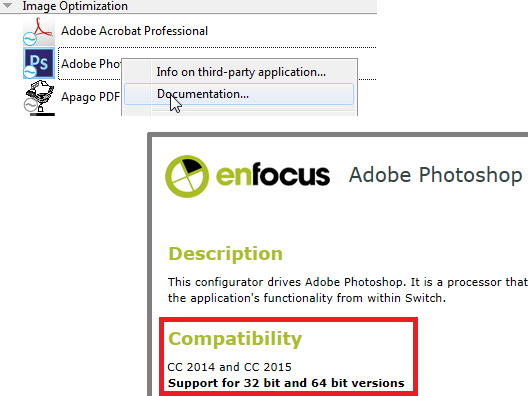
Adobe versions.Tip: To ensure you have installed the appropriate version, open the configurator documentation (via the context menu in the Elements pane) and check the version number.
If for any reason you would like to revert to the C++ version of a configurator,
you should simply uninstall the scripted plug-in through Pack Manager (by
choosing Uninstall on the Installed tab).
This will restore the old version in the Flow elements pane of Switch.