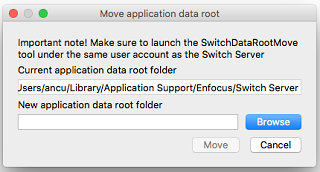
These preferences determine the location and configure the cleanup mechanism for Switch's application data.
Switch stores a lot of application-specific data, such as:
-
Flow definitions (defined or imported with the flow designer).
-
Auto-managed backing folders (and their contents, i.e. jobs being processed through flows).
-
Internal job tickets pointing to jobs being processed.
-
Log messages.
All this data is stored in a nested folder hierarchy under a single root folder, which is called the Application data root.
Some temporary application data cannot be removed automatically. To ensure that the amount of data does not grow indefinitely, Switch performs a cleanup process at regular intervals.
|
Property |
Description |
|---|---|
|
Application data root |
The location of the application data, i.e. the root folder for the hierarchy in which the Switch application data is stored. Default location:
Note:
|
|
Keep internal job tickets for (hours) |
The time period (in hours) after which internal job tickets may be deleted for jobs that left the flow; Switch will not delete internal job tickets for jobs that are still active. Note: A job is considered inactive, if it is located in a flow
output folder (i.e. a folder without outgoing connections)
disregarding if the job's unique prefix has been stripped or
not. This means its job ticket will be cleaned up after some
time. If your workflow configuration assumes handing over
jobs between flows (like described in the section on unique
name prefixes), please, make sure the time
difference between the moment a job reaches the end of the
previous flow and the moment the job is picked up by the
next flow is less than the value of this preference.
|
|
Keep log messages for (hours) |
The time period (in hours) after which log messages will be deleted. |
|
Run cleanup starting at (hh:mm) |
The time offset from midnight at which to run the cleanup process for application data. |
|
Run cleanup every (hours) |
The period or frequency with which to run the cleanup process for application data. |