These preferences allow you to configure the settings for the Mail send tool. If you do not configure them, you will not be able to send e-mail notifications. You can check if the settings are configured appropriately by clicking the Test connection button at the bottom of the dialog.
Property |
Description |
|---|---|
SMTP server address |
The URL or IP address of the SMTP email relay server. Example: smtp.gmail.com |
SMTP port |
The port used by the SMTP server. |
SMTP server requires authentication |
Defines whether the SMTP server requires authentication. If set to Yes, following additional fields
appear:
|
Encrypt connection |
Defines whether or not the mail server requires an encrypted connection (TLS1, 1.1, 1.2). Options: Yes/No. |
Sender name in emails |
The sender's name for outgoing email messages. |
Sender email address |
The sender's address for outgoing email messages. |
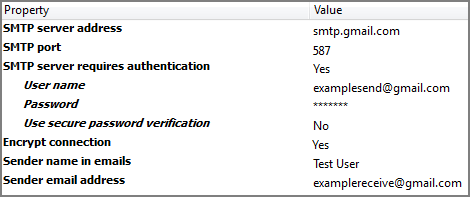
Example: The screenshot below is an example of the Mail send preferences required for sending e-mails using Gmail.