The Users pane allows you to manage the access rights of users
accessing the Switch Server from another computer, i.e.:
- Through the Switch Web Portal via Submit points and Checkpoints (requires a SwitchClient license) or to view log messages.
- From another computer than the one on which the Switch Server is installed, via Remote Designer.
You can open this pane, by clicking the Users button in the toolbar, or by selecting from the menu at the top of the application.
The Users pane consists of two parts:
- In the left part of the pane, you can configure users and user groups,
and assign them permissions for the Switch Web Portal and/or for Remote
Designer.
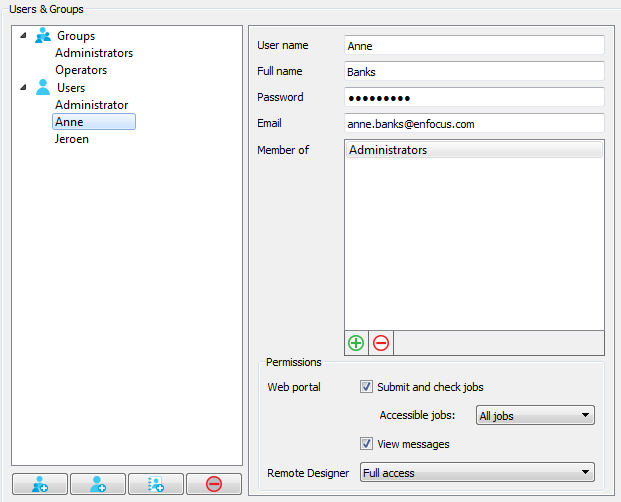
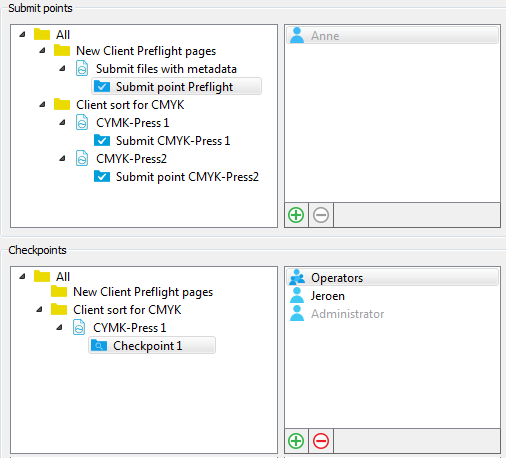
- In the right part of the pane, you can grant users and user groups access to
particular Submit points and Checkpoints. This part is only visible, if
you have activated the SwitchClient and/or the Web Services module.
The buttons in the toolbar allow you to import and export user information.
For more information, see Configuring Switch users and Assigning access to Submit points and Checkpoints.