A key feature of Switch is the ability to attach email information to the jobs that are being processed and use this info to send notifications or receipts.
- If jobs are submitted through e-mail, Switch can use the sender's email address to send him/her a receipt.
- Additional email info (email addresses or body text) may be attached to a job, e.g. to also inform customer sales representatives or operators of new jobs that were injected in the flow.
- If jobs are submitted in a folder hierarchy, notifications can be sent based on the folder the job is in. This is useful if the folders have the name of the customers or refer to the type of job being submitted.
"Email info" in Switch refers to both (a list of) email addresses and body text. This information is stored in the job's internal job ticket, so it can move along the Switch flows as metadata and be retrieved through variables ([Job.EmailBody] and [Job.EmailAddress]).
Note that Switch combines new email information with any email information already present. Email addresses are added to the list, and body text is appended to what's there (inserting a line break if needed). Existing email info is never removed.
The following topics explain how you can attach email info to a job in Switch and how this info can be used to send the appropriate email message to the appropriate recipient. This is also illustrated in the following example flow:
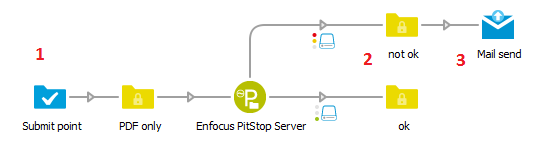
- Email info is attached when the job comes in. In this example, jobs are submitted via a Submit point and for example the email address of the user submitting the job is attached.
- Extra email info is attached when the job is moving along the flow. In this example, the preflight status is added as email info.
- The attached email info is used when (part of the) processing is finished to notify operators, customers or sales representatives. The Mail send tool is needed to send the notifications.