There are two ways to use email info attached to jobs in Switch:
- You can use the variables related to email, such as [Job.EmailAddress] and [Job.Emailbody], at any stage in the flow.
- You can use the attached info email in the Mail send flow element, using the
following properties:
- Include attached addresses
- Include attached body text
Example
Properties:
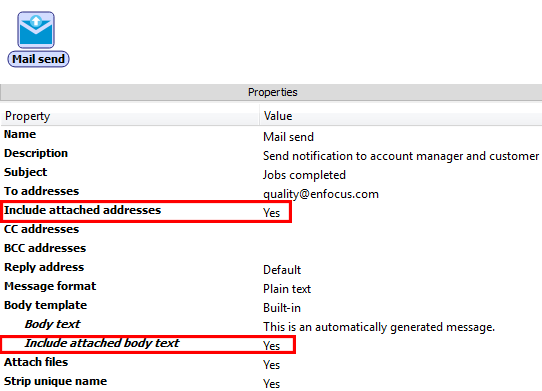
Below is an example of a mail sent via a Mail send flow element with the properties shown
higher:
- The email address in the From field is the address specified in the Switch Mail send preferences (User name property).
- The To field contains the email address(es) entered in the To addresses property (of Mail send) and the addresses attached to the job concerned.
- The Subject is the one specified in Mail send - Subject.
- The job file is attached.
- The body text contains the phrase "This is an automatically generated message" followed by the email message that was attached to the job earlier in the Switch flow.
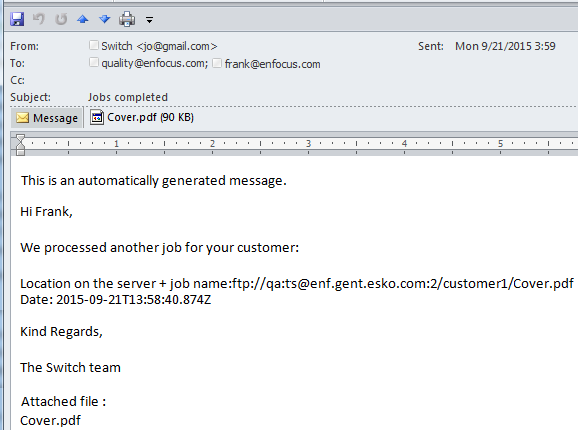
Note that this message contains two variables that were selected when configuring the email message: [Job.Origin] and [Switch.Date:TimeZone="UTC"].
Note: Users of the Switch Web Portal can use the attached email info in a similar way with Checkpoint via mail to send reply messages for
jobs arriving in the Checkpoint.