What are Switch apps?
Apps are small applications that can be used as flow elements in Switch, without the need for a license for the Configurator module. They are available through the Enfocus Appstore and not linked to any Switch release: therefore, you can immediately install and use them in Switch.
Where to find apps?
You can search for Switch apps in the Enfocus Appstore (our new webshop) or from within Switch, through the search function in the Flow elements pane. The apps matching your search results are displayed in the bottom part, together with a link to the Enfocus Appstore, where you can buy them and immediately use them in your flows (without even restarting Switch!). For the detailed procedure, see Finding apps.
Purchasing apps
You can buy yearly subscriptions through the Enfocus Appstore. See Purchasing an app. If your subscription is about to expire, you'll receive an email and a notification in Switch. Make sure to pay the subscription fee in time, so your flows remain valid.
Not sure if a particular app suits your needs? You can download a free trial. See Trying an app for free.
Using apps on different Switch installations
Apps are linked to a Switch installation. You can however assign an app to a different Switch and use it there without having to buy an additional license. If you want to use your apps on different Switch installations at the same time, you need of course multiple licenses.
For more details, refer to see Assigning an app to a different Switch installation.
New versions
As soon as there are new versions of the apps you have purchased, you'll receive a notification in Switch and you're entitled to use this new version immediately. For the detailed procedure, see Installing a new version of an app.
Note that you're never obliged to switch to a newer version, and that you can go back to a previous version as required.
Notifications
As soon as you start working with the Enfocus Appstore, you'll get notifications. They are displayed in the top right corner of the application. They inform you about newly installed apps, new versions, the status of your license (e.g. apps that are about to expire,...)
If a notification is available, you will see a "bell" icon. The number indicates the number of new (unread) notifications that are waiting for you.
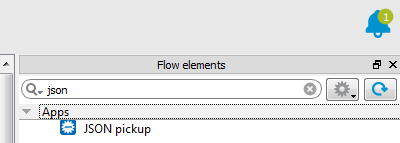
You can open the notifications by clicking the icon and closing them
again by clicking anywhere in Switch. However, if you don't want to see the message anymore, you
should click the cross icon, and the notification will disappear. 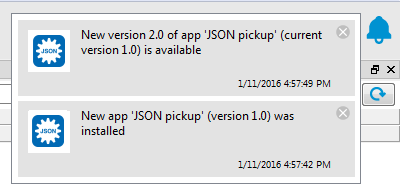
Apps versus configurators
Apps are similar to configurators, yet there are a number of differences as explained in the table below.
| Apps | Configurators |
|---|---|
| Purchased through the Enfocus Appstore | Installed with Switch |
| You can only buy the apps you need | Fixed set of configurators |
| Not linked to a Switch release | Linked to Switch release |
| Subscription model (yearly subscriptions) | License model (included in the Configurator Module) |
| Can be used with the Switch Core Engine | Configurator Module required |
| Can have all kinds of functionality | Connect to third-party software |