Configurators
After licensing the Configurator Module, you will see a number of configurators in the Flow elements pane. They are included in the Switch installer and automatically updated if a more recent version is available in the next update.
However, there are many more third-party applications that have configurators for Switch. For a complete list, go to https://www.enfocus.com/en/products/switch/partner-integrations-crossroads.
To use these configurators with Switch, you must download and install them.
Note that you must also have installed the third-party application. Otherwise the configurator may be shown in the Flow elements pane (in gray), but you won't be able to use it.
Additional flow elements for which no configurator is available
- Execute command allows you to configure command-line applications through the regular Switch user interface (rather than console commands and options).
- Generic application allows you to control any third-party application that supports hot folders.
These flow elements are only available if you have licensed the Configurator Module.
PitStop Server and PitStop Server PDF2Image Configurator
If you have an active PitStop Server license, you don't need to activate the Configurator Module to use the PitStop Server and the PitStop Server PDF2Image Configurator. In that case, the PitStop Server Configurators are also available if you have only licensed the Core Engine Module.
More information needed?
- Go to the Switch Partner Integrations page on the Enfocus website.
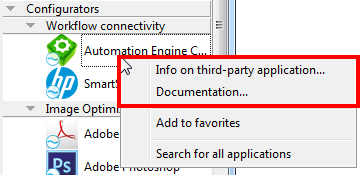
- In Switch, right-click the Configurator and select Info on third-party
application or Documentation.
- Check this Reference Guide. It may contain additional information about the configurator you are interested in (See Remarks/Extra documentation in Configurator overview).