About the Tools pane in Adobe Acrobat DC
In Acrobat DC, the Enfocus PitStop panels are not shown by default in the Tools pane; you have to add them manually before you can use the PitStop Pro tools. However, once they are available, you can use them in the same way as in previous Acrobat versions.
Refer to Adding PitStop Pro panels to the Tools pane in Acrobat DC.
 gives access to the other tools belonging to this panel.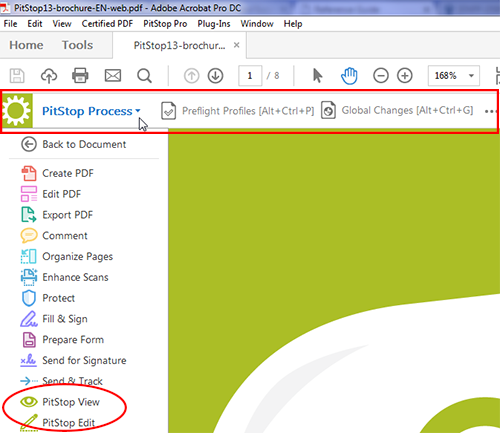
PitStop Process panel
| Tool | More info |
|---|---|

Preflight Profiles |
|

Global Changes |
|

Action Lists |
|

QuickRuns |
|

QuickRun Favorites |
|

Navigator |
Using the Enfocus Navigator |

No Active Variable Set
[Active Variable Set] |

Certified PDF panel
| Tool | More info |
|---|---|
   
Certified PDF |
Working with Certified PDF documents |


Sign and Save |
PitStop Inspect panel
| Tool | More info |
|---|---|

Select Object |
Selecting objects |

Inspector |
Using the Enfocus Inspector |

Eyedropper |
Viewing object attributes using the Eyedropper tool |

Measure |
Measuring the distance between two points |
PitStop Edit panel
| Tool | More info |
|---|---|
|
Select Object |
Selecting objects |

Select Similar Objects |
|

Group |
Grouping and ungrouping |

Ungroup |
|

Copy and Paste Attributes |
Copying and pasting object attributes |

Move |
Moving an object |

Rotate |
Rotating an object |

Shear |
Shearing an object |

Scale |
Scaling an object |

Add Rectangle |
Creating new shapes |

Add Ellipse |
|

Edit Shadings |
Applying gradients to text or line-art objects |

Add Path |
|

Edit Path |
|

Add Anchor Point |
|

Remove Anchor Point |
|

Edit Text Line |
|

Edit Paragraph |
|

Edit Vertical Text Line |
|

Find and Replace Text |
|

Edit Form |
Editing forms |

Place PDF File |
Placing PDF documents in PDF documents |

Undo |
Undoing or redoing actions |

Undo Selection |
|

Redo |
|

Redo Selection |
|

Select Area |
— |

Select Polygonal Area |
PitStop View panel
| Tool | More info |
|---|---|

Show Page Boxes |
Page boxes |

Hide Annotations |
Showing or hiding annotations |

Show All Layers |
Working with Layers |

Show Wireframe |
Viewing a PDF document in wireframe view |

Speed Up Image Display |
Speeding up image display using alternate images |

Workspaces |
Workspaces |
PitStop Color panel
| Tool | More info |
|---|---|

Color Management Switched off 
Active Color Management Preset |
Managing color |

Convert Color |
Converting a color using the Enfocus Convert Color Panel |

Apply Output Intent |
Rendering intents |

Image Matching |
Using ICC profiles |

Color Picker |
Shortcut to the color picker, allowing you to manage and check the color libraries. |
PitStop Page Box panel
| Tool | More info |
|---|---|

Edit Design Layout |
Design Layouts |

No Active Design Layout
[Design Layout Activated But Not Applied]
[Design Layout Applied] |
|

Edit Page Boxes |
|
|
Show Page Boxes |


- All icons exist in two flavors: the gray version is used when the tool is inactive; the green version is used when the tool is activated.